
Published Oct 29, 202612 min read
The AI Changes Every Quarter. Your Connections Should Not.
Every assistant switch resets months of setup because the connection lives inside the client. The architectural fix: one identity-bound MCP link per user, with credentials, policy and audit outside the assistant, so ChatGPT, Claude, Gemini, Cursor and your own agents share the same capabilities.

By Renato Marinho
Founder · Vinkius
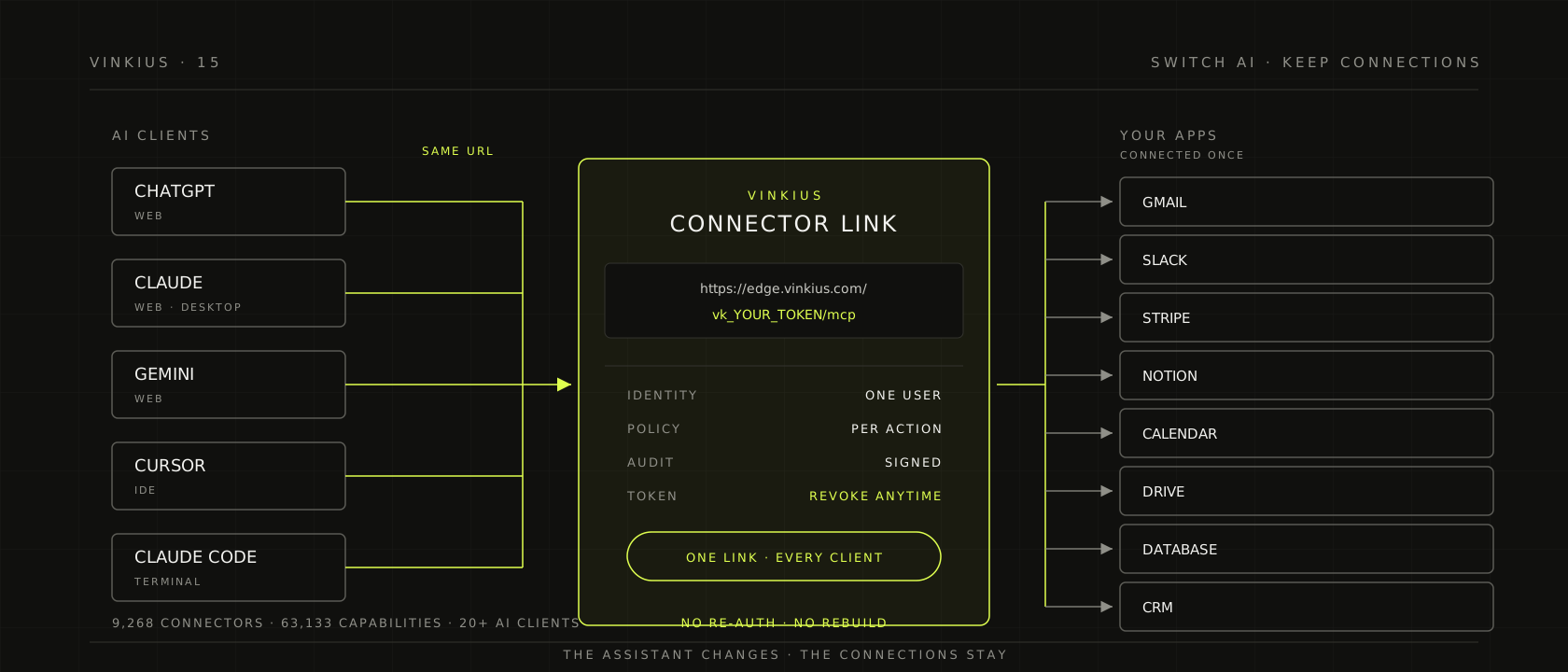
On a Tuesday, a team moves from ChatGPT to Claude. The subscription takes thirty seconds. The setup takes three weeks.
Not because Claude is hard. Because eleven apps were connected inside ChatGPT, each with its own OAuth grant, its own scopes, its own small piece of institutional memory. The new assistant starts with none of it. Someone re-authorizes Gmail, Slack, Notion, Stripe and the internal database. Someone discovers that the old assistant had a broader calendar scope than the new one allows. Someone asks why the audit trail has a gap on the day of the switch, and nobody has a good answer.
The invoice for the model is visible. The invoice for the switch is not, and it is usually larger.
I founded Vinkius, and this is the pattern I see in almost every team that uses AI seriously. The assistant is treated as the place where work happens, so the connections are built there. But the assistant is the least durable layer in the stack. Models change every quarter. Clients change their connector model, their settings screen, their pricing. The apps you connect are the stable part. The relationship between your people and those apps is the asset.
The mistake is architectural, not tactical. We standardized the tool call with MCP, and then we let each client own the connection that produces it. The result is a connection layer duplicated per assistant, per user, per device, and impossible to audit as one system.
Switching AI should be a paste, not a migration.
The bill you do not see
Every switch has a visible cost and a hidden one. The visible cost is the subscription, the seat count, the migration email. The hidden cost is the work of rebuilding the relationship between your team and its apps, one consent screen at a time.
| What a switch actually costs | What happens | Why it compounds |
|---|---|---|
| Re-authentication | Every app asks for consent again, per client | Each grant creates a new token with its own expiry and scope |
| Permission drift | The new client exposes a different permission model | Policy lives in the UI, so it is re-created by hand |
| Audit discontinuity | Logs stay with the old provider | There is no single timeline across the switch |
| Integration rebuild | Each client has its own connector format | The work repeats for every app and every client |
| Identity confusion | Personal and work accounts blur | The wrong account can act with the right intent |
| Context loss | Prompts, favorites and routines stay behind | The assistant forgets how your team works |
None of this shows up in a benchmark. All of it shows up in the first month.
Three layers of lock-in
Model lock-in is the one everyone discusses. It is real, but it is priced. You can measure it, negotiate it, route around it with a second provider, and the market keeps pushing the price down.
Client lock-in is the one everyone feels. It is the habit, the keyboard shortcut, the team convention, the project that already lives in a sidebar. It is real too, but it is mostly a UX problem, and UX problems have a way of being solved by the next release.
Connection lock-in is the one nobody names. It is the cost of rebuilding the relationship between your people and their apps every time the interface changes. It does not appear on a contract. It appears as three weeks of setup and a gap in the audit trail.
Draw the matrix. Five assistants across the top, twelve apps down the side. Sixty cells. Each cell needs an auth flow, a credential, a scope, a policy and a log line. Now add a second user, a second device, a second agent framework. The matrix multiplies, and every cell is maintained by someone who did not build it.
A connectivity layer collapses the matrix. The apps are connected once. Each client gets one link. The policy and the record live in the layer, not in the cell.
What breaks when the connection lives inside the client
The credential inherits the client's security posture. The fastest way to connect an app to an assistant is to paste a token into its configuration. Now the token is in the client's storage, in its logs, under its retention policy, and in the context window of a model you do not control. A connection that lives in the client inherits the client's security posture, which is not a sentence any security team wants to sign.
The permission model is re-created by hand. Each client has its own idea of what a connector can do. A permission that exists in one assistant may not exist in the next, and the policy that was carefully scoped on Monday is rebuilt from memory on Wednesday. The drift is invisible until an action that should have been blocked succeeds.
The audit trail splits at the switch. When the call is made by the client, the record is made by the client. Switch clients and the timeline splits in two. The question after an incident is not "what did the model say" but "who authorized this action, for which account, at what time". A per-client log cannot answer that across clients.
The maintenance never ends. Every client ships a new connector format, a new settings screen, a new JSON shape. Every app changes its API, its scopes, its OAuth flow. The integration work does not disappear when you move to a managed connector. It moves to whoever maintains the connector, and if that person is you, it comes back every quarter.
The identity gets shared. A link pasted into a team channel is a shared identity. A token committed to a repository is a shared identity. A connection that was supposed to belong to one person now belongs to everyone who can read the channel. The connection must be bound to a person, not to a chat window.
Portability is an architecture, not an export button
The word portability usually means a button that exports your data. That is not enough. A CSV of your connections does not re-authenticate them, does not carry permissions, does not preserve the audit trail, and does not make the next client work. Portability is a property of the path, not of a file.
A connection is portable when it satisfies eight requirements:
| Requirement | What it means in practice |
|---|---|
| Stable endpoint | One URL per user that does not change when the client changes |
| Identity-bound | The endpoint carries the person, not the chat window or the device |
| Open protocol | The boundary speaks MCP, so any compatible client can plug in |
| External credentials | Secrets live in a vault, never in the client or the model context |
| External policy | Authorization is evaluated per action, outside the client's UI |
| External audit | Every call is recorded on the layer, in one timeline |
| Revocable token | The link can be revoked and reissued without rebuilding the apps |
| Same capabilities everywhere | Chat, IDE, terminal and your own agents see the same catalog |
If a connection dies when the client is uninstalled, it was never yours.
How one link does it
The unit is a Connector link, a URL shaped like https://edge.vinkius.com/vk_YOUR_TOKEN/mcp. It carries your identity to the layer. You paste it into ChatGPT, Claude, Gemini, Copilot, Perplexity, Grok, DeepSeek, Cursor, VS Code, Windsurf, JetBrains, Claude Code, Cline, Lovable, Antigravity, OpenClaw/ClawX, Goose, Claude Desktop, or any MCP-compatible client. For agents you build, the same capabilities arrive through the AI Connect SDK, with adapters for the Vercel AI SDK, OpenAI Agents, Anthropic, Google ADK, LangChain, CrewAI, Semantic Kernel and AutoGen.
One link, one identity, every client.
The catalog is just-in-time. The model does not need to learn 9,268 Connector names. It searches by the task, inspects the capabilities, connects and runs. Today the catalog carries 9,268 managed Connectors and 63,133 capabilities, and the number moves as the catalog syncs.
The app credentials are not in the client. They are encrypted at rest and never returned to the model. The policy is evaluated per action. The audit trail is written on the layer, so it survives the switch. The link is a bearer token: treat it like a key, keep it out of repositories, and revoke it from the console if it leaks. A new token is issued in seconds, and the old one stops working.
The same link works in an IDE or a desktop client. Claude Desktop reads it from its configuration file:
{
  "mcpServers": {
    "vinkius-ai-connections": {
      "url": "https://edge.vinkius.com/vk_YOUR_TOKEN/mcp"
    }
  }
}
The client changes. The configuration changes. The link does not.
A migration you can run this week
Inventory the connections. List the apps, the owner of each account, the scopes in use and the last time each one was called. Do not start with the easy apps. Start with the ones that would hurt if they were connected to the wrong account.
Connect once in the layer. Authorize each app one time, in one place. The work is per app, not per app per client. That is the whole difference between a matrix and a list.
Paste the link into a second client and run three real tasks. One read, one write, and one that should be blocked. The third test is the important one. Portability without a deny is just convenience.
Move the policy to the layer. Per-action approval for destructive operations, data loss prevention patterns for PII and financial fields, a spend ceiling, and one switch that stops every agent. The policy applies to every client at once because it does not live in any of them.
Retire the old per-client tokens. The migration is not done when the new client works. It is done when the old path is closed. Revoke the tokens that were pasted into client configs, and check that nothing still depends on them.
Document the owner and the rotation. A bearer token with no owner is an incident waiting for a date. Put the link under the same discipline as any other production secret.
The lock-in objection
Every architecture conversation eventually reaches this question: aren't you just replacing one lock-in with another?
It is a fair question, and the answer is a distinction. Lock-in by hostage means leaving costs you the ability to work. Lock-in by value means leaving costs you a better product, but you can still work. The first is a trap. The second is a choice.
A connectivity layer should make the exit cheap on purpose. The protocol is open. The link is yours. The token can be revoked and reissued. The connections are not stored in a client that can deprecate them. If the layer disappeared tomorrow, you would lose convenience, not your apps or your accounts. That is the standard I want to be held to.
Portability is not a feature you add at the end. It is the reason the layer exists.
Security is the precondition
One link that reaches every app is a skeleton key, and a skeleton key without control is worse than ten scattered tokens. Portability and governance are the same design: both require the connection to live on a path you control.
The controls are not optional extras. They are what makes the link safe to carry:
- Per-action authorization, evaluated before the call leaves, instead of a broad token scope.
- Credential isolation, with secrets encrypted at rest, authenticated with a signature and never placed in the model path.
- Data loss prevention patterns matched in memory before the response reaches the model.
- A tamper-evident audit trail, where each record is chained to the previous one and signed.
- Spend ceilings and a circuit breaker that halts a loop before the invoice does.
- One emergency switch that deactivates every Connector, revokes every token and ends every session.
Because the controls live in the layer, they apply to every client at once. That is the second benefit of portability: you fix a policy once, and it holds in ChatGPT, Claude, Cursor and the agent you deploy next month.
The longer argument for each control is in The Control Plane of the Agent Era and AI Governance.
Frequently asked questions
Does switching clients lose my chat history? Chat history belongs to the client and stays there. What follows you is the connection: the apps, the credentials, the permissions and the execution record. Those are different assets, and only one of them should be tied to the assistant.
Do all AI clients support this? Any MCP-compatible client can paste the link. More than 20 clients are covered today, including the major chat apps, IDEs and coding agents. For clients without MCP, or for your own agents, the AI Connect SDK exposes the same capabilities through framework adapters.
Is one link safe? It is a bearer token, so it is only as safe as its handling. Keep it out of source control, bind it to one identity, revoke it if it leaks, and rotate it on a schedule. The layer enforces per-action policy even when the link is valid, so a leaked link does not automatically mean a free hand.
Can two clients use the same link at the same time? Yes. Each call is attributed to the same identity and recorded in the same trail. If you need separate identities, issue separate links.
What about my own agents? The same catalog is available through the SDK, with per-user connectors and credentials. The model runtime changes; the connection does not.
Is this only for MCP? MCP is the boundary we standardize on because it is the widest plug. The layer itself is protocol-agnostic, and the SDK adapters cover frameworks that do not speak MCP directly.
The assistant is a tab
The assistant is a tab. The model is a version number. The connection is the work.
Models will keep changing. Clients will keep shipping new settings screens. The apps your team runs on will stay roughly the same, and the relationship between your people and those apps should not be rebuilt every time the interface does.
Set it up once. Paste the same link into whatever AI you use next. Switch AI. Keep the connections.